Contents
Make a character look like you: turn “alike” into numbersMeasure your own four numbersSliders have no units: go big to small, one at a timeTake a screenshot and measure againA likeness and a better-looking face are two different thingsThe same idea behind artwork matchWhen the game offers only hair and clothesFAQKey points
- Sliders have no units, so you cannot type your numbers in: build, screenshot, measure, compare, and go round again.
- Four numbers, all from one front-facing photo: length ÷ cheekbone width, jaw ÷ cheekbone width, eye gap ÷ eye length and middle ÷ lower third.
- Big to small: face width and length, then jaw, then eyes, then nose and mouth. One slider at a time.
- In one virtual-world study, most people's avatars were small edits of their own looks. Decide first whether you want a likeness or an improvement.
- The four ratios cover outline and spacing, not eye, nose or lip shape, so matching ratios can still look like someone else.
Make a character look like you: turn “alike” into numbers
Back to GTA 6: Rockstar has not published the full appearance options, and none of the reports we found mentions feature sliders, so that has to wait for the real screen after launch (the last section covers what you can do when there are no sliders). But whatever this game offers, and whichever game you play, the reason a character does not look like you is the same, and so is the fix below.
Likeness feels like a gut call, but it breaks down into a few numbers. Measure them and character creation stops being slider guesswork and becomes matching a target.
The loop has four steps:
- Measure four ratios on a front-facing photo of yourself.
- Open the creator and build from large to small, one slider at a time.
- Take a screenshot of the character from the front and measure it the same way.
- Go back and fix the biggest gap. Repeat until the two sets of numbers are close.
What you cannot do is step 2 by typing numbers in. A slider’s scale belongs to the game: it is not centimetres and not a ratio, and a 50 in one game is not the same face as a 50 in another. That is why steps 3 and 4 exist. You close in on the target one round at a time.
Measure your own four numbers
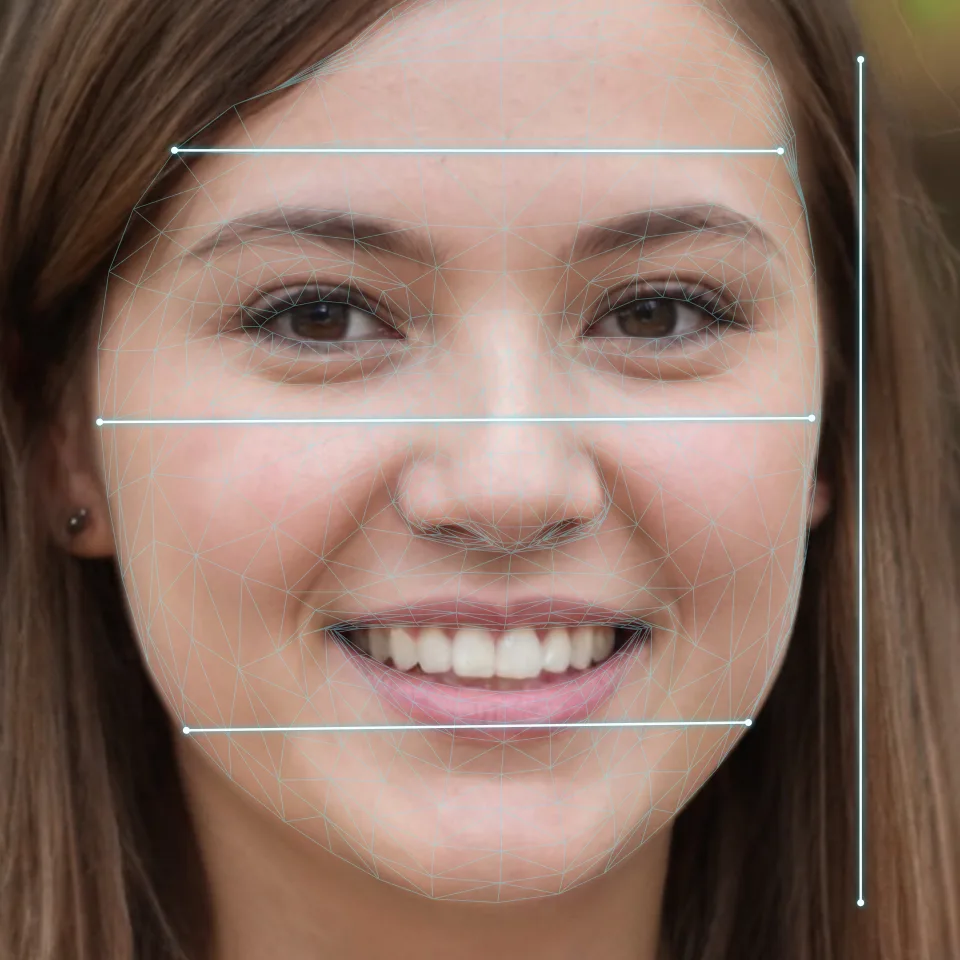
Use one front-facing photo for all four. Take it as described in front-facing photo: head level, 1.5–2 m away with the rear camera, even light, a relaxed face. A close selfie enlarges the nose and narrows the sides, so the ratios are off before you start; the reason is in selfie distortion.
- Length ÷ cheekbone width: how long the face is. The sample photo gives 1.19; the method is in the face shape guide.
- Jaw ÷ cheekbone width: how much the lower face narrows. The sample gives 0.79.
- Eye gap ÷ eye length: the distance between the inner eye corners divided by the length of one eye, averaged over both eyes. The sample gives 1.25; see eye spacing.
- Middle ÷ lower third: the brow line to the base of the nose, divided by the base of the nose to the chin. The sample gives 0.99; see facial thirds.
Each number covers one thing: how long the outline is, how the lower face narrows, the sideways gap between the eyes and how high the features sit. Ratios have no units, so it does not matter how big a screenshot is, and your photo and the character can be compared directly. Four are enough. More only get harder to measure accurately and harder to match.
Measure each one three times. The spread between the three is the precision of your own ruler, and differences smaller than that are not worth chasing later.
Now pick a front-facing photo of yourself and measure all four.
Sliders have no units: go big to small, one at a time
Games name their sliders differently, so the table runs from what you measured to a type of slider, not to a fixed name.
| What you measured | Look for this kind of slider | Before you move it |
|---|---|---|
| Length ÷ cheekbone width | Face width, face length, cheekbone width | Set the big outline first and leave the features for later |
| Jaw ÷ cheekbone width | Jaw width, jaw angle, chin width | A small number means the lower face narrows a lot |
| Eye gap ÷ eye length | Eye spacing, eye size | Make the eyes bigger and the eye-gap reading changes |
| Middle ÷ lower third | Brow, nose and mouth height, chin length | Move one and the others may be dragged along |
The order is big to small: face width and length first, then jaw and chin, then the eyes, then nose and mouth. In some games a change to the big outline moves where the eyes, nose and mouth sit, so setting the large shapes before the small ones means less rework. This is reasoning from how the sliders work; we found no study comparing orders.
Move one slider at a time and look after each. Pull three together and you cannot tell which one did the work.
Take a screenshot and measure again
Turn the character to face front, put the camera level with the eyes, relax the expression and take a screenshot. Then measure the same four ratios the same way: same four lines, same arithmetic.
- Fix the biggest gap first and leave the small ones. A gap smaller than your ruler’s precision is just noise.
- Pull the camera back if the creator allows it. The closer the camera, the bigger the nearest features, on a screen as on a photo.
- On cartoon or stylised faces the hairline and the jaw point are hard to place. Compare length ÷ cheekbone width and the eye gap first and judge the rest by eye.
- Put the photo and the screenshot side by side rather than comparing with your memory. You are used to your mirror image, which is flipped and differs from both a photo and a screenshot; see why you look different in photos.
An example: your four numbers are 1.19, 0.79, 1.25 and 0.99, and the screenshot of the character measures 1.30, 0.79, 1.20 and 0.95. Look at how far off each one is: length ÷ cheekbone width is about 9% higher, eye gap ÷ eye length and middle ÷ lower third are each about 4% off, and the jaw matches. The biggest gap is the length, so nudge the length slider toward shorter, take another screenshot and measure again. The other two, if they fall within the spread of your three measurements, can wait.
Finally, go into the game and take one screenshot indoors and one outdoors. In some games the creator’s lighting differs from the game world’s, and players often report it. Kotaku’s 2020 review of Cyberpunk 2077’s creator put the blame on lighting: a harsh cold light washed out warm skin tones. The proportions have not changed, but they read differently. How light changes a face is covered in selfie lighting.
A likeness and a better-looking face are two different things
Decide which one you want first. In 2019 the University of Alberta reported a study that set avatars in the virtual world Second Life against photos of their users. Most avatars were small edits of the user’s real looks. Identity traits such as race and gender barely moved, and what changed most were body shape, hair and clothes. Those were virtual-world users, not players of single-player games, but the direction carries over. For a likeness, change less. For a better-looking face, change one thing at a time and keep track of what you changed.
Matching ratios does not guarantee a likeness. Psychologists who study face recognition sort the cues into kinds: the basic layout of the face, the spacing between features and the whole put together, and adults use all three (Maurer and colleagues, 2002). Your four ratios cover outline and spacing. They say nothing about eye shape, nose shape or lip shape, so with ratios right and eye shape wrong the character still does not look like you. Those shapes are covered in eye shape types, nose shape types and lip shape types.
The same idea behind artwork match
Turning a face into a few ratios and then comparing the ratios is not only for character creators. FacialRate’s artwork match works the same way. It measures six facial ratios on your device from a front-facing photo, covering eye shape, face shape and the spacing of the features, then compares them with ratios measured on public-domain sculptures and portraits from museum collections and picks works that are close to you. The faces in the collection were measured with the same landmarks and ratios, so both sides come from one ruler and can be compared directly.
Two things differ from your character: it compares six ratios, not four, and the other side is a museum work, not a character you built. The lessons above still hold:
- One ruler for both sides. Your photo and your screenshot only compare if you measure them the same way. The same goes for you and an artwork.
- Same photo, same result. A photo with a different angle or expression gives different ratios, and the works picked can change. It is the same effect as a smile shortening the eye in your own measurements.
- Close ratios are not the same as looking alike. That is why the report says where you are close, with no similarity percentage and no ranking: the distance between two sets of ratios does not convert into how alike two faces look. It is the point of the section above: matching ratios can still look like someone else.
Artwork match is part of the full report, an optional one-time purchase. See artwork match.
When the game offers only hair and clothes
Not every game has feature sliders. Some protagonists are written characters, and the game lets you change only hair and clothes. GTA 6’s two leads, Lucia and Jason, are written characters. Rockstar has not published the full appearance options, none of the reports we could find mentions feature sliders, and what they say about hair, clothing and tattoos is inconsistent. Go by the actual screen once the game is out.
With no sliders, all you can change is what surrounds the face: hair, glasses and, in some games, a beard. The length ÷ cheekbone width and jaw ÷ cheekbone width you measured above are what to choose them by; see hairstyles for your face shape, glasses for your face shape and beard styles for face shape.
FAQ
Which part of the face do I set first in a character creator?
The width and length of the face, then the jaw and chin, then the eyes, and the nose and mouth last. In some games the big outline moves where the later features land, so going big to small means less rework.
Why does my character look right in the creator but not in the game?
Usually light and camera. The creator's lighting can differ from the game world's, and how close the camera sits changes proportions. Take screenshots from the same angle in the same light; if the ratios have not moved, the problem is light and camera, not the face you built.
Can you customise your face in GTA 6?
Rockstar has not published the full appearance options. None of the reports we found mentions feature sliders, and what they say about hair, clothing and tattoos is inconsistent, so go by the screen in the actual game.
Does my character have to look exactly like me?
No. In one virtual-world study most people's avatars were small edits of their own looks. For a likeness, change less and one thing at a time; for a better-looking face, copy yourself first, then decide what to change.