Contents
Uneven skin in photos: the light or the skin?Side light and top light: the shadow follows the lightShine and overexposure: detail turns whiteWhite balance: one cheek yellow, one blueCompression and filters: texture erasedFive causes at a glance: how to avoid themFAQKey points
- Side light darkens one cheek; top light lights the forehead and darkens under the eyes. Face a window.
- The forehead, nose and chin shine and blow out first. With all three channels near 255, no detail is left.
- Window light plus a lamp turns one cheek yellow, the other blue. Use one light, not Auto white balance.
- Compression makes skin blocky; smoothing erases texture. Judge skin from an unfiltered original.
Uneven skin in photos: the light or the skin?
Check the light first. Skin in a photo is reflected light processed by a camera, and every step can add patches. Five causes are common: side light, top light, shine and overexposure, mixed white balance, compression and filters.
Each has a fingerprint. Side-light shadow follows the light. Blown white lands where the face turns most toward the light. Mixed light gives the cheeks opposite colours. Compression and filters change texture. Comparing cheeks with a colour picker is in even skin tone.
Side light and top light: the shadow follows the light
Side light: with the window to one side, the far cheek is darker overall. That is less light, not different skin. A hypothetical, not a measurement: cheeks reading 200 and 150 mean the bright side gets almost twice the light. The sample photo, taken facing a window, reads 201 and 197, about 5% apart.
Top light: a ceiling lamp lights the forehead and nose while the brow bone shades the eyes, which reads as patchy tone.
The fix: face a window without direct sun, ceiling light off. If unsure, put the window on your other side and shoot again; if the dark side swaps, it was the light. Positions are in selfie lighting.
Shine and overexposure: detail turns white
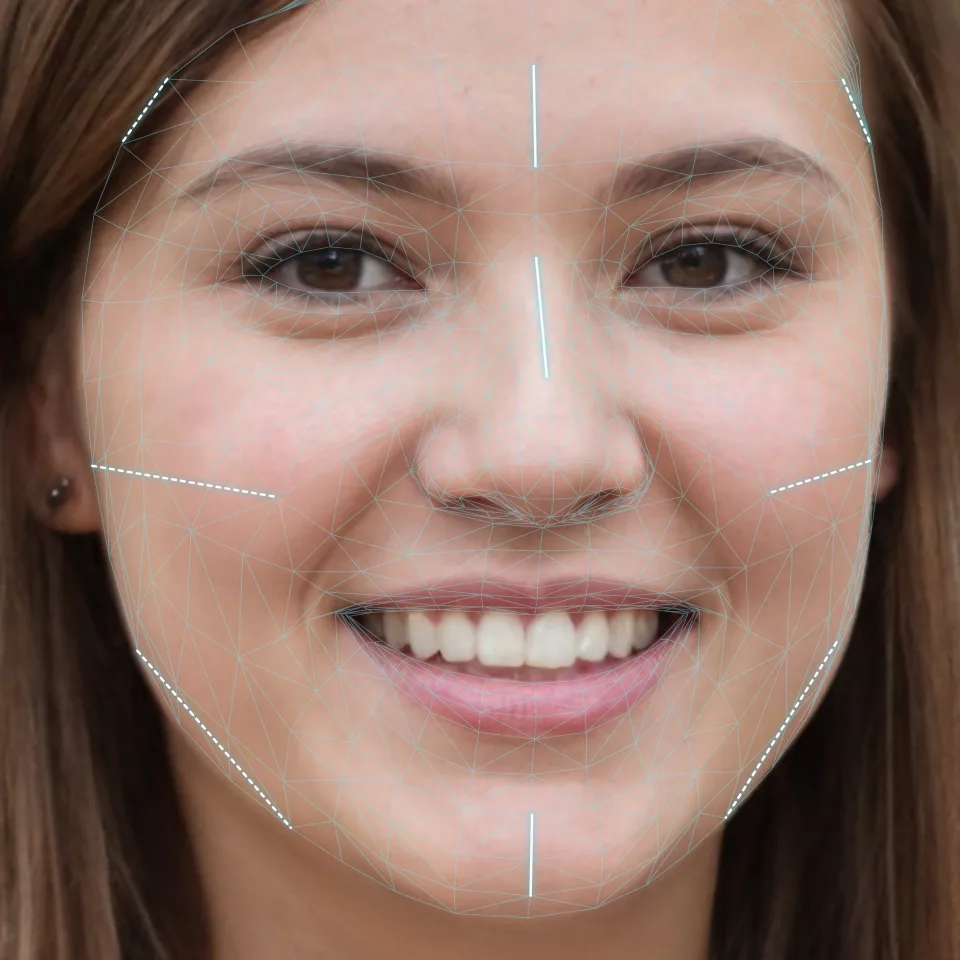
The solid lines above mark where light from the front and above lands first: forehead, bridge of the nose, chin. Shine starts there, because an oily surface bounces light straight into the lens. A dermatologist notes oilier skin looks shiny in photos.
Brighter still and it blows out: all three channels hit about 255, and texture and colour are gone, hard to recover from a phone photo. Direct flash does this most easily.
Blot the forehead and nose first, tap the forehead on screen to expose for it, and use soft window or overcast light. In the sample photo’s three patches, no pixel has all three channels above 240.
White balance: one cheek yellow, one blue
Window light runs cool; many room lights run warm. With both on your face, the window-side cheek goes blue and the lamp side yellow, hard to fix afterwards.
A colour picker shows it: on the yellow cheek, R and G sit well above B; on the blue cheek, B rises. The sample photo has one light, and its cheeks’ redness reads 0.057 and 0.066.
Switch every lamp off and pick Daylight or Cloudy, not Auto, which guesses again every frame.
Compression and filters: texture erased
Heavy compression hits large smooth areas of skin first: detail blurs, blocks appear, gradients become steps. That is the file, not the skin.
Smoothing filters flatten texture and shading, and some add sliders for skin tone and rosiness. Even cheeks with a filter on are the slider’s work. Filters also move features, see beauty filters.
Judge skin from an unfiltered original, zoomed in. Screenshots and forwarded images may be shrunk and recompressed.
Five causes at a glance: how to avoid them
| Cause | What you see | How to avoid it |
|---|---|---|
| Side light | One cheek darker | Face the window |
| Top light | Bright forehead, dark under eyes | Ceiling light off |
| Shine, overexposure | White forehead, nose, chin | Blot, expose for highlights, no direct flash |
| Mixed white balance | One cheek warm, one cool | One light, Daylight or Cloudy |
| Compression, filters | Blocks, no texture | Filters off, original file |
Rule out all five, and a difference that stays put is the skin. For comparisons, or a face report, keep one window, one time of day, no makeup or sunscreen left on. A photo shows shine, not skin type; see how to know your skin type.
FAQ
Does flash make skin look more even?
Direct on-camera flash washes out skin detail and tone. A diffuser on the flash gets close to a softbox; at home, a window is simpler.
Is an overcast day good for photographing skin?
Yes. Clouds spread the light, so shadows are soft and no strong highlights wash out colour. It runs cool, so pick the Cloudy preset.
Why is shine worse in afternoon photos?
After washing, oil slowly returns, so oilier skin gets shinier through the day. To compare photos, shoot at one time of day and blot first.