Contents
Even skin tone: what does it actually mean?How much of a photo is the light?Measure it yourself: colour picker and black and whiteUneven in the photo: the light or the skin?How to read this seriesFAQKey points
- Evenness is measured inside one face, cheek against cheek and cheek against forehead, for brightness and redness.
- Skin colour is mostly brown melanin and red blood, so unevenness has a darker part and a redder part.
- Side light, overhead light, overexposure, mixed light, compression and filters can all make an even face look patchy.
- Compare the cheeks with a colour picker or in black and white. If the difference follows the light when you turn, it was the light.
Even skin tone: what does it actually mean?
Something narrow: in one photo, different parts of your face look alike. Left cheek as bright as right, cheeks as red as the forehead. It ignores how light or deep your skin is and compares you only with yourself.
In 2021, ten physicians from eight countries agreed on categories for how skin looks. Tone evenness is one, built from three things: how uniform the pigment is, redness, and overall colour. They also agreed people usually want a more even tone, not a different colour.
That matches where skin colour comes from: mostly brown melanin and the red of blood near the surface, plus a little yellow. So unevenness splits roughly into two strands, darker and redder.
How much of a photo is the light?
A photo records light bouncing off skin, then processed by a camera. Side light darkens one cheek. Top light lights up the forehead and nose. Overexposure turns highlights white. Two colours of light make one cheek yellow and the other blue. Compression and filters rewrite texture and colour.
Dermatologists judge tone evenness from standardised photos, same light and angle, because the reading moves with the conditions. A skin-analysis company names uneven light, expression, head angle and leftover makeup or sunscreen as sources of error.
So suspect the light first. Each cause’s fingerprint, and how to avoid it, is in uneven skin in photos.
Measure it yourself: colour picker and black and white
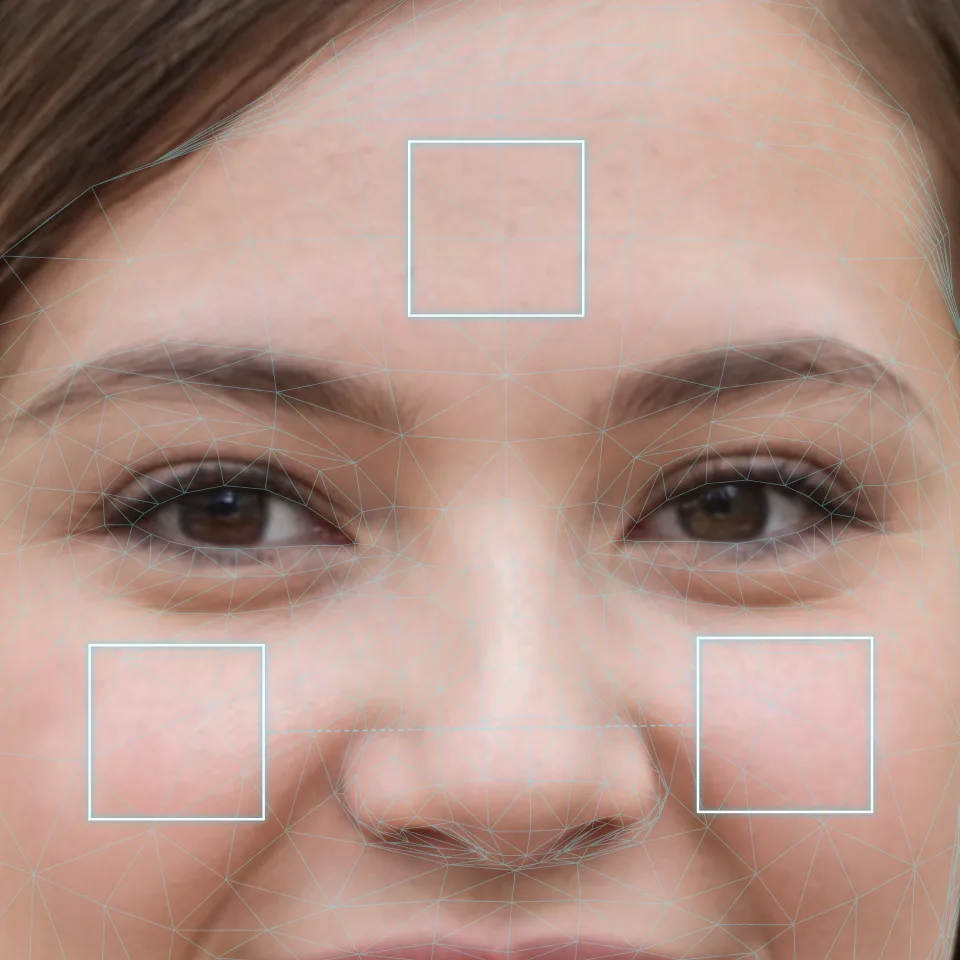
Measure; don’t eyeball.
- Use an original photo taken facing a window, not a screenshot.
- In a photo editor, sample the three patches in the diagram with the colour picker set to average a small area.
- Note R, G and B: their average is brightness; R above G is redness.
- Or convert to black and white, and the darker side is obvious.
The sample photo has even front light. Medians: photo-left cheek 201, photo-right cheek 197, forehead 191 (out of 255). These values are not proportional to light; converted back, the cheeks differ by about 5%, roughly 0.07 stops (a stop is double the light), and the forehead is about 0.14 stops darker. Redness: 0.057, 0.066, 0.056. No pixel has all three channels above 240: nothing is blown.
Uneven in the photo: the light or the skin?
The most useful trick: move the window from your left to your right and shoot again. If the dark side swaps, it was the light.
| Cause | What you see | How to tell |
|---|---|---|
| Side light | One cheek darker overall | Turn around; the dark side swaps |
| Overhead light | Bright forehead, dark under the eyes | Face a window; the gap shrinks |
| Shine, overexposure | White patches on forehead, nose | All three values near 255 |
| Mixed light | One cheek yellow, one blue | Lamps off; the colour gap goes |
| Compression, filters | Blocky skin, texture gone | Filters off, original file |
| The skin itself | Same spot in every photo | Survives new light and angle |
A hypothetical, not a measurement: a side-lit photo reading 200 and 150 on the cheeks means the bright side gets almost twice the light.
How to read this series
Three more articles, one question each:
- Uneven skin in photos: what each lighting and processing cause leaves behind, and how to avoid it.
- Basic skincare routine: cleansing, moisturising and sun protection.
- How to know your skin type: five types and the wash-and-wait method.
A photo shows shine and evenness, not skin type. To compare yourself over time, fix one setup: same window, same spot, same time of day, no makeup or sunscreen left on. Where to stand is in selfie lighting. A face report built from one evenly lit front-facing photo can show how even your two cheeks look in that shot.
FAQ
Does even skin tone mean lighter skin?
No. It only asks whether one face matches itself. Deep and light skin can both be very even, and both can look patchy under side light.
How big a gap between the cheeks counts as uneven?
No general line exists; the numbers depend on camera and light. Shoot a few photos the same way and check whether the gap stays in one place.
Why convert the photo to black and white?
It drops colour and keeps brightness, so whatever difference survives is brightness, not redness.