Contents
Beauty filters: is it just skin smoothing?The jaw and chin move mostCommon edits and the proportion each one changesYour phone may have it on by defaultHow to tell whether a photo has been changedFAQKey points
- Filters come in two kinds: smoothing and brightening change the skin; big eyes, face-slim, V-face and nose edits change positions and distances.
- Developer documentation for several video effects kits lists separate reshape controls for eyes, jaw, chin, nose wings, mouth and face length.
- The front camera may have beauty settings on by default. Check before you shoot and switch them off or to 0.
- A quick test for how far a photo has been changed: would someone recognise you from it?
Beauty filters: is it just skin smoothing?
No. Beauty filters fall into two groups that change very different things.
One works on skin: smoothing, brightening, blemish removal. Colour and texture change; every point stays put.
The other works on geometry: big eyes, face-slim, V-face, nose edits. These find landmark points on the face, then push or pull the pixels around them by the amount you set. The distances really change.
A 2025 study compared filters from several social and beauty apps on face recognition. The filters that hurt recognition most were the ones that warp facial geometry; the ones that mainly shift colour tones did the least.
So: measure a photo with geometry filters on, and you measure the slider.
The jaw and chin move most
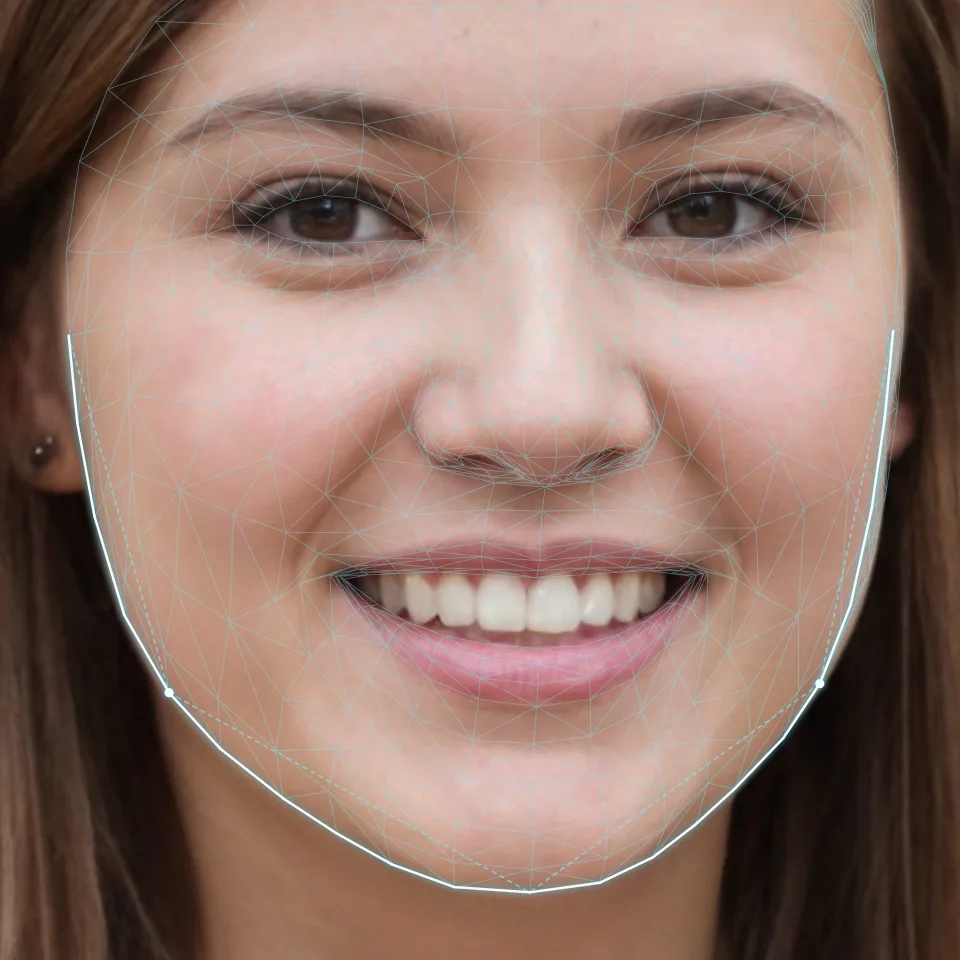
Several video effects kits publish their beauty documentation. Among the shape controls, the lower face gets the most: face-slim, V-face, jaw scaling, chin length, face length, and in some kits separate widths for the lower and upper face.
The diagram shows where these controls act: the outline from below each ear to the chin, and the two jaw angles. Face-slim pushes the outline inward, V-face sharpens the chin, and the jaw angles can change with them.
On the sample photo: jaw width 460, cheekbone width 582, ratio 0.79. Pull each side of the jaw in by just 10 pixels and the jaw is 440, the ratio 0.76, enough to shift how the face shape reads. That is an illustration, not any filter’s actual setting.
The jaw types themselves are in jawline types.
Common edits and the proportion each one changes
| Common edit | What moves | Proportion it changes |
|---|---|---|
| Big eyes | Whole eye scaled up | Eye length, eye height, eye spacing vs face width |
| Eye angle | Outer corners raised | Eye-tail tilt |
| Face-slim, V-face, jaw | Cheeks and jaw pulled in | Jaw ÷ cheekbone width, jaw angle, face shape |
| Chin length, face length | Chin moved up or down | Lower third, length-to-width ratio |
| Nose edits | Nose wings narrowed | Nose width, mouth-to-nose ratio |
| Mouth shape, smile | Mouth smaller, corners lifted | Mouth width, corner direction |
| Hairline | Hairline lowered | Upper third |
| Smoothing, brightening | Skin texture and tone | No distances, but the light and shade of depth |
Researchers who study AR beauty filters list where they tend to push faces: smooth, even skin, almond-shaped eyes, full lips, a small nose, prominent cheekbones. Each maps to a row above.
Your phone may have it on by default
Some phones ship with beauty settings on for the front camera. A 2016 news story described one maker’s selfie beauty mode as on by default, making the face look narrower and the eyes bigger. In 2020 another phone maker switched face retouching off by default and said it would label what each setting changes.
Names differ between phones, but the check is similar:
- Open the camera, switch to the front lens, and look for a beauty, retouch, soft-skin or face-shape button or option.
- Turn each one off or to 0, smoothing included.
- Check the camera’s settings page too, and any social app’s own filters.
How to tell whether a photo has been changed
A phone-headshot guide’s checklist has the simplest test: would someone recognise you from this photo? If they would hesitate, a filter has probably reached the face shape.
For measuring, the bar is higher: no changes at all. Some official passport rules say the photo must be unaltered by software. Take one photo with every beauty setting off and put it next to your usual ones; jaw and eye differences show quickly. That unfiltered photo is also the one to use for a face report, since a filtered one would measure the filter.
One kind of distortion has nothing to do with filters: a phone too close to the face enlarges the nose and pulls the sides back. See selfie distortion. The full setup is in front-facing photo.
FAQ
If I only use skin smoothing, are proportions affected?
Smoothing doesn't move points, so distances hold. It does flatten light and shade, which can blur the edge of the face and the nose bridge.
Does portrait mode count as a filter?
Background blur leaves the face alone. Studio-style lighting effects repaint light and shadow on the face and don't always follow its contours.
Is selfie distortion the same thing?
No. Close-range distortion comes from distance; filters are software moving features by setting. Both can happen in one photo.